
Getting into Nana Bet takes a phone, a few minutes and an account that belongs to you alone. This page covers the Nana Bet ET login and sign-up routes, what verification involves and how to fix the usual access problems.
It is an independent information site about the brand, not the operator's own website. Players must be 18+ and located in Ethiopia.
18+ · Ethiopia
Who can register
Three conditions apply: you are at least 18 years old, you live in Ethiopia, and you have not opened an account before. One person, one account. Duplicates are usually blocked, and winnings on a second account can be frozen.
Use your real name and details. They must match your ID later, when payouts are checked.
Nana Bet registration methods
The sign-up form is built for phones. Which options are shown can change, so treat the table as a general guide and check the form itself.
| Method | Data requested | Confirmation |
|---|---|---|
| Phone number | Mobile number, password, currency (Br) | SMS code |
| Email address, password | Link or code by email | |
| Quick (one-click) form | Country and currency, sometimes only a phone number | Details are completed later in the profile |
Keep one phone number
The number you register with is also what you will use to log in and receive codes, so pick one you will keep.
How to register on Nana Bet step by step
Create your Nana Bet account
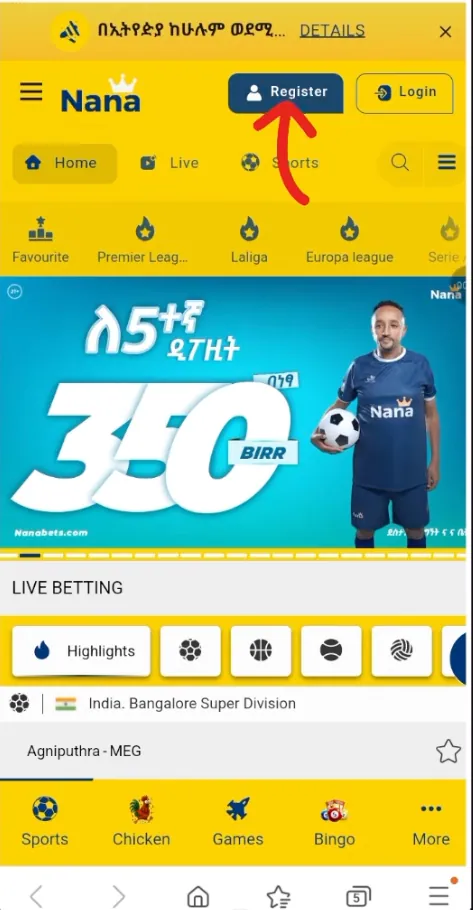
Open the sign-up page
Tap the Nana Bet registration button on this page or in the header. The form opens in your browser.
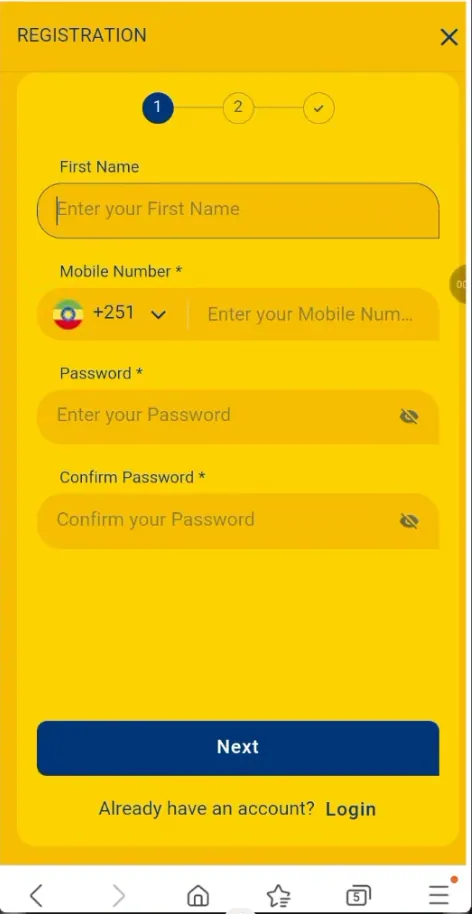
Fill in the form
Enter your phone number or email, create a password and choose ETB as the currency. Enter a promo code only if you have one.
Confirm you are 18+
Tick the box confirming your age and the terms. Read them first; they set the rules for bonuses and withdrawals.
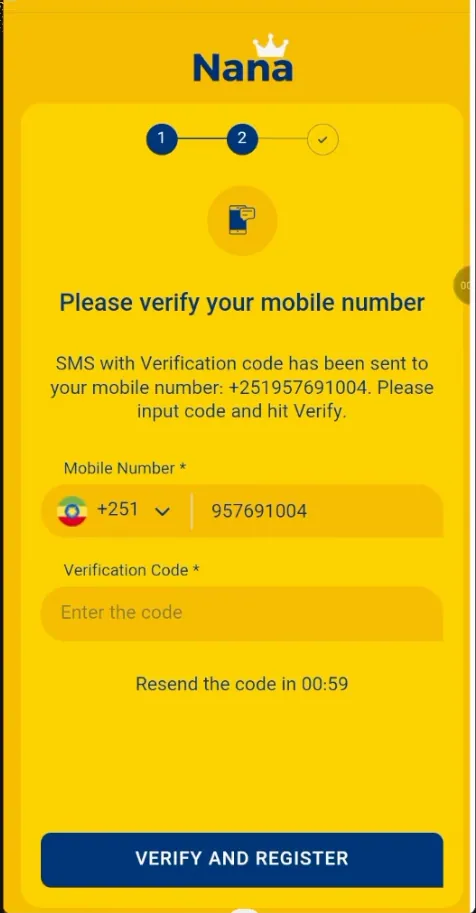
Confirm your contact
Type the SMS or email code you receive. Codes expire quickly, so request a new one if it is late.
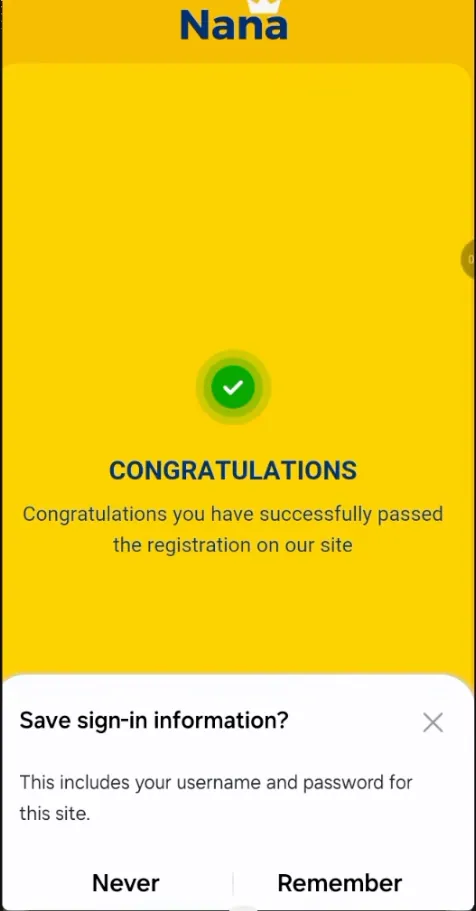
Finish and log in
A confirmation screen means the account is ready. From here you can make a first deposit; see payments in Ethiopia for the methods.
New players often ask about the welcome offer. Conditions change, so read the current terms on the bonuses page before you deposit.
Account verification (KYC)
Verification proves that you are who you say you are and that you are of legal age. It is normally requested before the first withdrawal, or when the system flags unusual activity.
- Documents: usually a government ID such as the Kebele ID, passport or driving licence, sometimes a selfie with it.
- Details: the name and date of birth must match your profile exactly.
- Timing: often from a few hours to a couple of working days. Blurry photos are the main cause of delays.
Which documents are accepted is decided by the operator, so follow what the profile asks for.
Nana Bet login
Logging in uses the details you registered with. On the Nana Bet login mobile screen enter your phone number (or email) and password, then tap Login. The Android app keeps you signed in on the same device, so you do not need to type the password every time.
- Remember me: tick it only on a phone that is yours.
- Two-step confirmation: if it is offered in the profile, turn it on. Codes arrive by SMS.
- Same account everywhere: the website and the app share one balance and one history.
Login problems and fixes
- "Wrong password": check the keyboard language and caps lock, then reset the password.
- No SMS code: wait a minute, check the signal and the number, and request the code again.
- Page does not load: switch between mobile data and Wi-Fi, clear the browser cache or update the app.
- Account blocked: this often follows several failed attempts or a pending verification. Contact support.
Password recovery
- Tap Forgot password on the login screen.
- Enter the phone number or email used at registration.
- Type the code you receive and set a new password.
- Log in with the new password.
Managing your account
- Phone number or email change: usually done through support after identity confirmation, since both are used for security codes.
- Personal data: name and birth date are locked once verified. Contact support if there is a mistake.
- Bet history: look in the profile or account menu for the history of bets and transactions.
- Closing or deleting the account: send a request to support. Withdraw your balance first.
- Self-exclusion and limits: if gambling stops being fun, ask for a break or permanent exclusion. Tips are on the Responsible Gaming page.
Contact number and support
Players searching for a Nana Bet contact number should use only the contacts listed inside their account or on the official operator site. Numbers found in random chats or comments are a common scam route.
Account security
Pros
- A strong, unique password of 10+ characters
- Login only on your own device
- Official app or site only
Cons
- Sharing SMS codes with anyone, including callers posing as support
- Using the same password as on other sites
- Logging in via links from messages
Play responsibly
Betting is for adults aged 18+ and carries a risk of losing money. Set a budget before you start and never bet money you need for daily life.
Frequently asked questions
How do I log in to Nana Bet in Ethiopia?
Open the site or the Android app, enter the phone number or email you registered with and your password, then tap Login.
How do I register on Nana Bet from my phone?
Open the registration form, enter your phone number or email, create a password, choose ETB, confirm you are 18+ and type the code you receive.
Can I register without a phone number?
Email registration may be offered alongside the phone option. Check which fields the current form shows.
I forgot my Nana Bet password. What now?
Tap Forgot password on the login screen, enter your phone number or email, confirm the code and set a new password.
Do I need to verify my account?
Verification is normally requested before the first withdrawal. Prepare a clear photo of a valid ID.
Can I have two accounts?
No. Only one account per person is allowed, and duplicates can be blocked.
How can I find the Nana Bet contact number?
Use the contacts shown inside your account or on the operator's official site, and ignore numbers sent by strangers.
How do I close my account?
Withdraw your balance and send a closing request to support. Self-exclusion is also available on request.